JPEG Optimization: The Web Developer’s Ultimate Guide
The JPEG format has been the backbone of web imagery for decades, powering everything from e-commerce product photos to social media feeds. However, uploading raw JPEG files directly from cameras without proper optimization is one of the fastest ways to torpedo your website’s performance. Understanding how to properly prepare and compress JPEG images can mean the difference between a lightning-fast site and one that frustrates users with sluggish load times.[1]
Why JPEG Compression Matters for Website Performance
JPEG files straight from digital cameras are notorious performance killers. A typical smartphone photo can easily exceed 5MB, while professional DSLR images often reach 10-20MB. When users attempt to load these massive files, the results are predictable: slow page loads, increased bounce rates, and poor search engine rankings.[2]
Modern web users expect pages to load within 2-3 seconds. Google’s research confirms that page speed directly impacts SEO rankings, with faster-loading sites receiving preferential treatment in search results. Images account for over 70% of most web pages’ total weight, making image optimization the single most impactful performance improvement you can implement.[3][4]
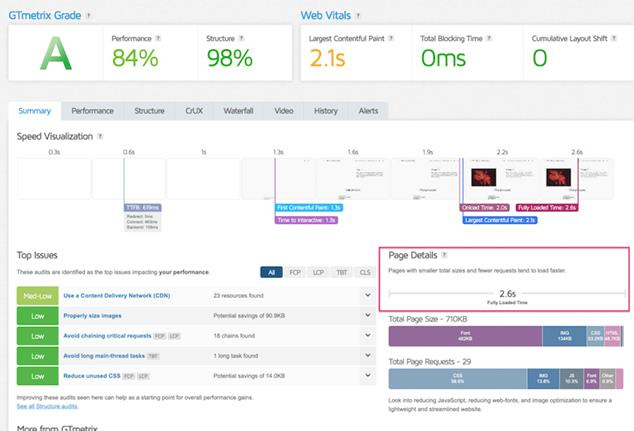
GTmetrix dashboard shows how proper image optimization and page performance metrics relate to faster website load times.
The beauty of JPEG lies in its flexibility. Through intelligent compression algorithms, you can reduce file sizes by 70-90% while maintaining visually acceptable quality. This compression works by analyzing the image content and removing redundant data that the human eye typically cannot detect.[5][6]
The Science Behind JPEG Compression
JPEG compression operates through a sophisticated process that identifies textures, patterns, and colors automatically. The algorithm breaks images into 8×8 pixel blocks, analyzing each block’s frequency components and discarding high-frequency details that contribute less to perceived image quality.[5][6]
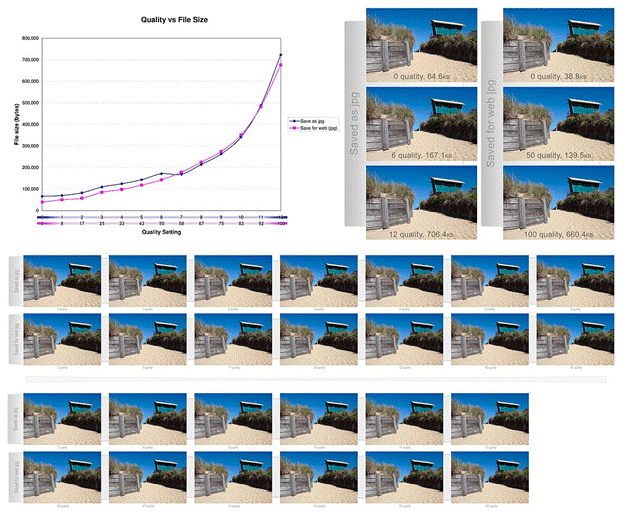
Comparison of JPEG compression quality levels showing their impact on file size and image appearance using a beach photo.
This lossy compression approach allows for dramatic file size reductions. For photographs with complex colors and gradual transitions, JPEG can achieve compression ratios of 10:1 or higher without visible quality degradation. The key lies in finding the optimal balance between file size and visual fidelity.[5]
Optimal JPEG Settings for Web Use
Compression Quality Guidelines
Professional web developers typically compress JPEG images to 70-85% quality for web use. This range provides the ideal balance between file size reduction and visual quality retention. Images compressed to 85% quality pass Google PageSpeed Insights’ optimization thresholds, while 70% compression often produces files that are virtually indistinguishable from the original to most viewers.[7][8]
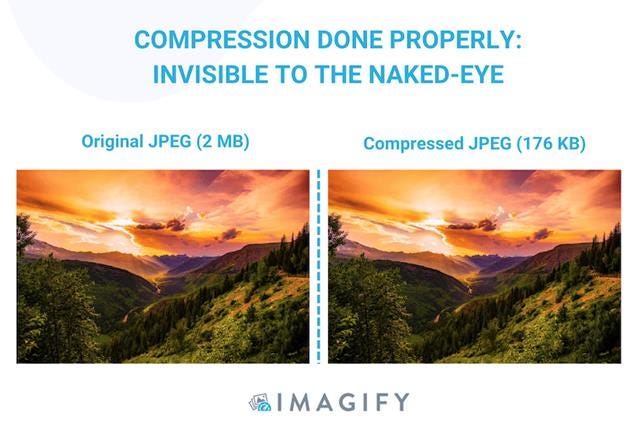
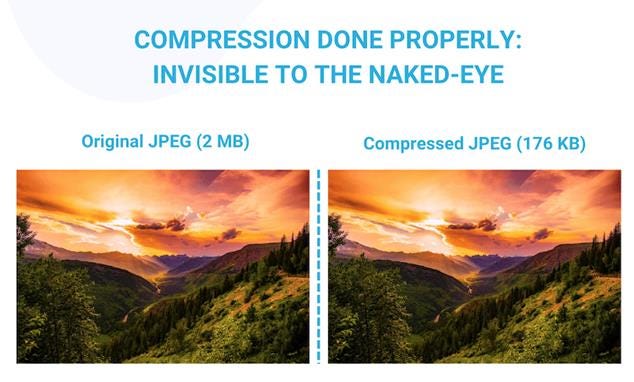
Comparison of original and compressed JPEG images showing nearly identical visual quality despite significant file size reduction.
File Size Targets
Modern websites should aim for specific file size benchmarks:
· Hero images and backgrounds: Under 500KB[2][9]
· Product photos and content images: 100-200KB[10][9]
· Thumbnails and small images: Under 70KB[10]
· Critical above-the-fold images: Under 300KB for optimal Largest Contentful Paint (LCP) scores[11]
Progressive vs. Baseline JPEG Encoding
Progressive JPEGs offer a significant user experience advantage over baseline encoding. While baseline JPEGs load from top to bottom in a single pass, progressive JPEGs load in multiple stages, displaying a low-quality version almost immediately and gradually improving the image quality as more data arrives.[12]
This technique creates the perception of faster loading, even when the total download time remains similar. Users see something immediately rather than waiting for the complete image to render.[12]
Advanced Optimization Techniques
Responsive Image Sizing
One crucial optimization strategy involves creating multiple image sizes for different devices. A desktop hero image might require 1920px width, while mobile users need only 320px versions. This approach prevents mobile users from downloading unnecessarily large files:[3]
<picture>
<source media=”(min-width: 1024px)” srcset=”hero-1920.jpg”>
<source media=”(min-width: 768px)” srcset=”hero-1024.jpg”>
<img src=”hero-500.jpg” alt=”Hero image”>
</picture>
Next-Generation Format Fallbacks
While JPEG remains universally compatible, modern formats like WebP offer 25-34% better compression than JPEG while maintaining similar quality. Smart websites serve WebP to compatible browsers while falling back to JPEG for older browsers:[13][14]
<picture>
<source type=”image/webp” srcset=”image.webp”>
<img src=”image.jpg” alt=”Optimized image”>
</picture>
Image Optimization Tools and Workflows
Online Compression Services
Several free and premium tools excel at JPEG optimization:
· TinyJPG/TinyPNG: Offers intelligent compression with minimal quality loss[1][6]
· Squoosh: Google’s browser-based tool for real-time compression comparison[15]
· Kraken.io: Professional-grade bulk optimization service
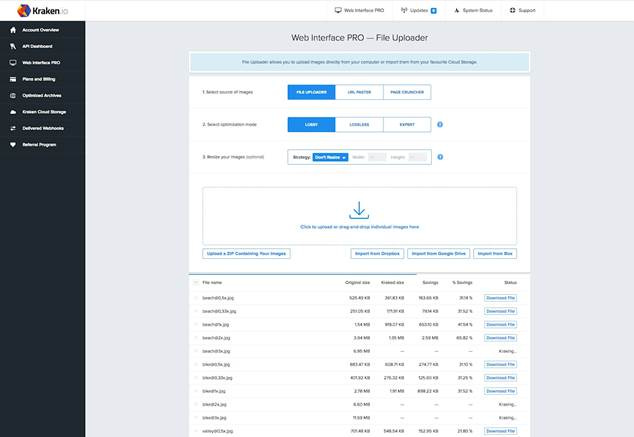
Web interface of Kraken.io File Uploader showing image compression and resizing options with file size savings.
· ImageOptim: Advanced optimization with multiple algorithms[3]
Automated Optimization Pipelines
For high-volume websites, automated optimization becomes essential. Content delivery networks (CDNs) can compress and resize images on-the-fly based on device characteristics and network conditions. This approach ensures optimal delivery without manual intervention.[16][17]
WordPress users benefit from plugins like Imagify, ShortPixel, and Smush, which automatically optimize uploaded images. These tools can reduce image sizes by 50-80% while maintaining visual quality.[11][16]
Implementation Best Practices
Lazy Loading Strategy
Implement lazy loading for images below the fold to reduce initial page load times. Modern browsers support native lazy loading through the loading=”lazy” attribute:[16][17]
<img src=”image.jpg” loading=”lazy” alt=”Description”>
Critical images above the fold should load eagerly to optimize Core Web Vitals scores, particularly Largest Contentful Paint (LCP).[17][11]
SEO-Friendly File Naming
Replace generic camera filenames with descriptive, keyword-rich alternatives. Instead of “IMG_1234.jpg”, use “blue-running-shoes-nike.jpg”. This practice improves image SEO and accessibility.[18][19]
Alt Text and Metadata Optimization
Every image requires descriptive alt text that serves both SEO and accessibility purposes. Include relevant keywords naturally while providing meaningful descriptions for screen readers.[18][19]
Performance Monitoring and Testing
Regular performance auditing ensures your optimization efforts deliver measurable results. Tools like Google PageSpeed Insights, GTmetrix, and WebPageTest provide detailed analysis of image-related performance issues.[16][8][11]
Key metrics to monitor include:
· Page load time: Total time to fully render the page
· Largest Contentful Paint (LCP): Time to render the largest visible element
· First Contentful Paint (FCP): Time to first visible content
· Total page weight: Sum of all downloaded resources
· Image-specific metrics: Number and total size of image requests
Common Optimization Mistakes to Avoid
Over-Compression Pitfalls
While aggressive compression reduces file sizes, pushing JPEG quality below 60% often produces visible artifacts, particularly around text and sharp edges. Always test compressed images across different devices and screen sizes to ensure acceptable quality.[20]
Ignoring Device-Specific Optimization
Serving desktop-sized images to mobile users wastes bandwidth and slows performance. Implement responsive image strategies that deliver appropriately sized files based on viewport dimensions and device pixel ratio.[3][9]
Neglecting Modern Format Adoption
Websites that exclusively use JPEG miss opportunities for significant size reductions. While maintaining JPEG fallbacks for compatibility, progressive websites should embrace WebP and AVIF formats for modern browsers.[13][14]
Future-Proofing Your Image Strategy
The web imaging landscape continues evolving rapidly. AVIF format promises even better compression than WebP, while HTTP/3 and improved CDN technologies enable more sophisticated delivery optimizations.[13][11]
Successful websites adopt flexible optimization strategies that can accommodate new formats and delivery methods without requiring complete restructures. This approach ensures long-term performance benefits as web standards advance.
The investment in proper JPEG optimization pays immediate dividends through improved user experience, better search rankings, and reduced bandwidth costs. By implementing these evidence-based optimization techniques, you create a foundation for sustained website performance that benefits both users and business objectives.
⁂
1.
https://tinypng.com
2. https://oit.caes.uga.edu/control-your-image-file-size-for-best-website-performance/
3. https://web.dev/learn/performance/image-performance
4. https://themedev.net/blog/image-compression-perfect-quality-for-web-performance-and-seo/
5. https://www.readz.com/best-image-format-for-web-pages
6.
https://tinyjpg.com
7. https://nerdcow.co.uk/blog/how-to-optimise-images-for-web/
8. https://imagekit.io/blog/improve-google-pagespeed-insights-score-for-images/
9. https://tiny-img.com/blog/best-image-size-for-website/
10. https://sitechecker.pro/image-size-checker/
11. https://imagify.io/blog/optimize-images-page-speed-google/
12. https://bluegiftdigital.com/how-can-i-use-image-jpg-in-a-web-design-project/
13. https://unlimited-elements.com/webp-vs-jpeg/
14. https://themedev.net/blog/webp-vs-jpg-which-format-should-you-use-on-your-website/
15.
https://squoosh.app
16. https://www.hostinger.com/tutorials/complete-guide-to-image-optimization
17. https://webflow.com/blog/image-optimization-for-web
18. https://uploadcare.com/blog/how-to-optimize-images-for-web-best-practice-guide/
19. https://developers.google.com/search/docs/appearance/google-images
20. https://elementor.com/blog/jpg-vs-jpeg-3/
21. https://www.shopify.com/blog/image-sizes
22.
https://imagecompressor.com
23.
https://compressjpeg.com
24. https://www.liquidint.com/blog/why-image-size-matters-website-performance
26. https://www.reddit.com/r/ecommerce/comments/13aih8k/what_file_size_should_product_images_be_for/
27.
https://compressor.io
28. https://www.picturesandstories.com/news/2014/7/21/what-you-need-to-know-about-jpeg-compression
30. https://wpengine.com/resources/optimize-images-for-web/
31. https://cloudinary.com/guides/image-formats/jpeg-vs-webp
32. https://developers.google.com/speed/docs/insights/OptimizeImages
33. https://developers.google.com/speed/webp/docs/webp_study
35. https://www.shopify.com/blog/what-is-webp-file
37. https://arxiv.org/abs/2310.00788
38. https://www.adobe.com/uk/creativecloud/photography/discover/image-optimisation.html
39. https://developers.google.com/speed/docs/insights/PrioritizeVisibleContent