WebP Web Picture, Format: The Game-Changing Image Solution for Modern Web
The digital landscape has witnessed a revolutionary advancement in image technology with the emergence of WebP, Google’s next-generation image format that’s transforming how we handle web imagery. This modern format represents a significant leap forward in image compression technology, offering superior performance that combines the best features of traditional formats while addressing their limitations.[1][2]
Understanding WebP’s Technical Foundation
WebP operates on sophisticated compression algorithms utilizing VP8 and VP9 codecs, which deliver exceptional efficiency through predictive coding techniques. The format supports both lossy and lossless compression modes, providing flexibility for different optimization needs. Lossy WebP uses predictive coding similar to VP8 video compression, analyzing neighboring pixel blocks to encode only the differences, while lossless WebP reconstructs pixels using previously seen image fragments or local palettes.[2][3]
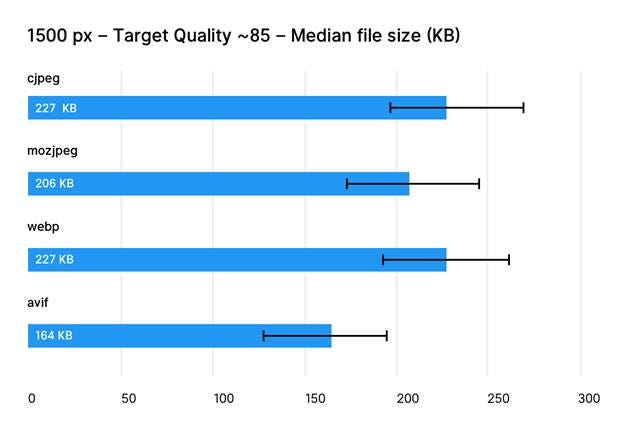
Comparison of median file sizes for different image formats (cjpeg, mozjpeg, webp, avif) at 1500 px width and target quality ~85.
Impressive Compression Performance
The most compelling advantage of WebP lies in its superior compression capabilities. According to Google’s official documentation, WebP delivers remarkable file size reductions across different scenarios:[2][4]
Lossy Compression Benefits:
· 25-34% smaller file sizes compared to JPEG images at equivalent quality levels
· Maintains visual fidelity while significantly reducing bandwidth requirements
· Particularly effective for photographic content
Lossless Compression Advantages:
· 26% smaller file sizes compared to PNG images
· Preserves complete image data without quality degradation
· Ideal for graphics requiring pixel-perfect accuracy
Transparency Support:
· Lossless WebP supports transparency with only 22% additional bytes
· Lossy WebP with transparency provides 3x smaller files than PNG
· Perfect for logos, icons, and complex graphics with transparent backgrounds
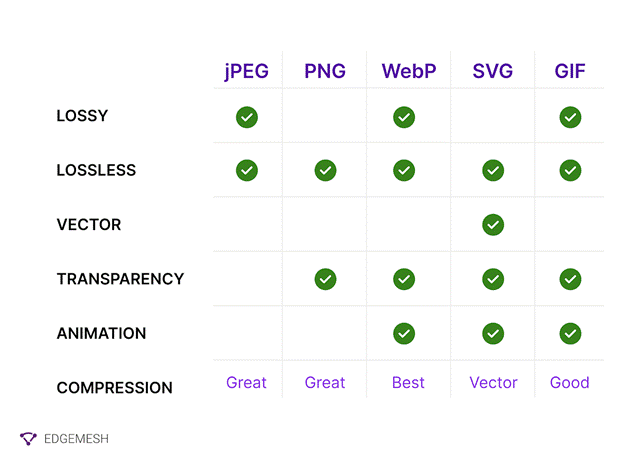
Comparison of image formats JPEG, PNG, WebP, SVG, and GIF highlighting WebP’s superior support for compression, transparency, and animation.
Animation Capabilities
WebP extends beyond static images by supporting animation functionality, positioning itself as a superior alternative to animated GIFs. This feature enables:[5][2]
· Smaller file sizes compared to traditional GIF animations
· Better visual quality with advanced compression
· Support for both lossy and lossless animated content
· Reduced bandwidth consumption for animated web elements
Browser Compatibility Landscape
WebP has achieved impressive browser adoption rates, with current compatibility reaching 96.3% across major browsers. The format enjoys full support from:[6][7]
Desktop Browsers:
· Google Chrome (versions 23+)
· Mozilla Firefox (versions 65+)
· Microsoft Edge (versions 18+)
· Safari (macOS Big Sur and later)
Mobile Platforms:
· Chrome for Android (all versions)
· Firefox for Android (all versions)
· Safari on iOS (14.5+)
· Samsung Internet (all versions)
Icon representing cross-browser compatibility between two web browser windows.
Only Internet Explorer 11 and KaiOS browsers lack WebP support, representing merely 0.577% of the total browser market share. This extensive compatibility makes WebP a practical choice for modern web development.[6]
Implementation Strategies
Modern web development offers several approaches for WebP integration while maintaining backward compatibility:
HTML5 Picture Element:
The <picture> element allows developers to specify multiple image sources, enabling browsers to automatically select the best supported format.[8]
Server-Side Content Negotiation:
Web servers can detect WebP support through Accept headers and serve appropriate formats automatically.[8]
JavaScript Detection:
Libraries like Modernizr provide client-side WebP support detection for dynamic implementation.[8]
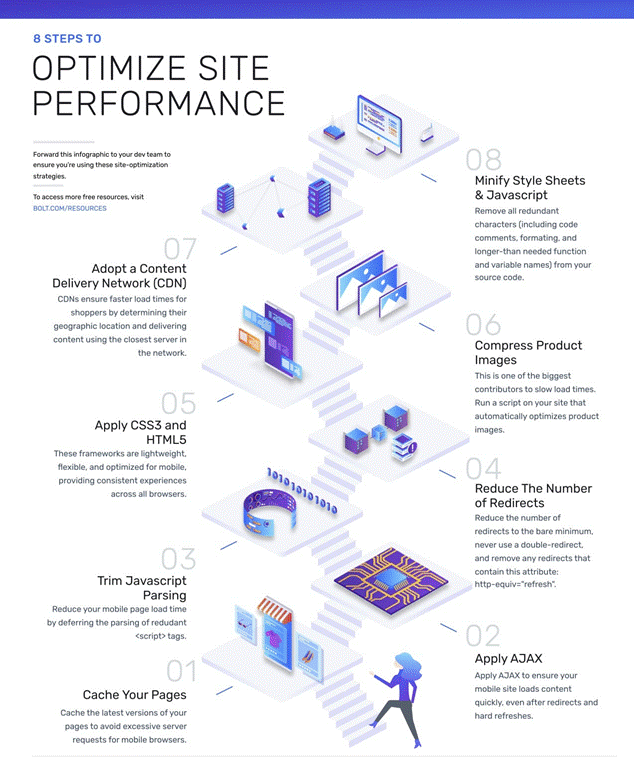
Eight essential steps to optimize website performance, including caching, AJAX, compressing images, and CDNs.
Real-World Performance Impact
Studies consistently demonstrate WebP’s effectiveness in practical applications. The Web Almanac 2022 reports that typical WebP images are one-third lighter per pixel compared to JPEG files, aligning with formal compression studies. This translates to:[9]
· Faster page loading times
· Reduced server bandwidth costs
· Improved user experience, particularly on mobile devices
· Better search engine optimization scores
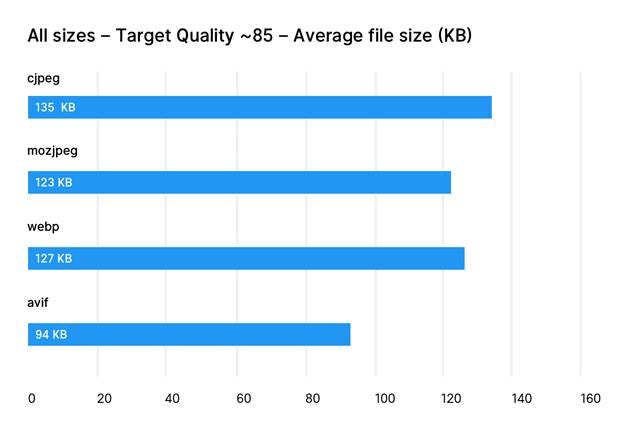
Comparison of average file sizes among cjpeg, mozjpeg, webp, and avif formats at target quality ~85.
Software and Platform Support
WebP has gained substantial support across design and development tools. Major applications now supporting WebP include Adobe Photoshop (2022+), GIMP, Sketch, and various content management systems. WordPress has offered native WebP support since June 2021, while other platforms provide plugin-based solutions.[1]
Social media platforms including Facebook, Slack, and Discord have integrated WebP support for messaging, though some limitations exist for animated WebP content.[1]
Considerations and Limitations
Despite its advantages, WebP has some technical limitations worth noting:
Color Space Restrictions:
· Lossy WebP supports only 8-bit YUV 4:2:0 format
· May cause color loss in pixel art or high-contrast graphics
· Lossless WebP works exclusively with 8-bit RGBA color space
Processing Requirements:
· WebP files require more computational time to create
· Not ideal for real-time image processing applications
· May impact server resources for high-volume image generation
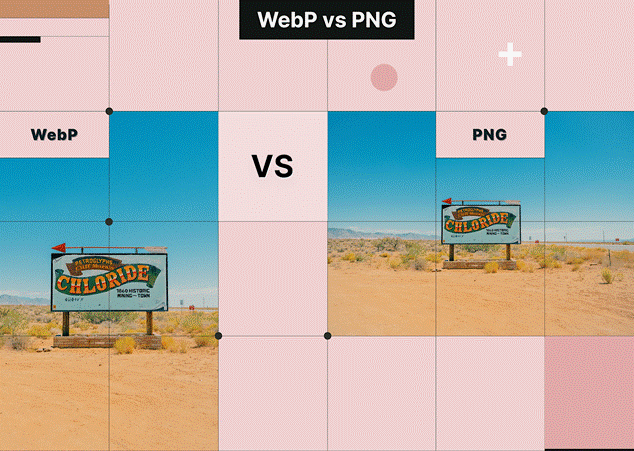
Side-by-side visual comparison of WebP and PNG image formats showing the same desert scene to illustrate quality and compression.
Future Outlook and Recommendations
WebP represents a mature, production-ready solution for modern web imagery. With browser support exceeding 96% and continued improvements in tooling and platform integration, WebP offers an excellent balance of compression efficiency, quality preservation, and practical usability.[6][9]
For web developers and designers prioritizing performance optimization, WebP provides a compelling upgrade path from traditional formats. The format’s ability to reduce bandwidth consumption while maintaining visual quality makes it particularly valuable for mobile-first development and performance-critical applications.
As the web continues evolving toward faster, more efficient content delivery, WebP stands as a proven technology that bridges the gap between legacy format compatibility and next-generation image optimization. While newer formats like AVIF may offer even better compression ratios, WebP’s established ecosystem and broad compatibility make it the pragmatic choice for immediate implementation in modern web projects.
⁂
1. https://en.wikipedia.org/wiki/WebP
2. https://developers.google.com/speed/webp
3. https://elementor.com/blog/webp-vs-avif/
4. https://www.fasterize.com/en/webp-and-avif-compress-all-your-images-in-just-a-few-clicks/
5. https://wbcomdesigns.com/webp-vs-png-vs-jpeg/
6. https://www.keycdn.com/support/webp-browser-support
7. https://www.lambdatest.com/web-technologies/webp
8. https://developers.google.com/speed/webp/faq
9. https://blog.tinify.com/pros-and-cons-webp-images/
10. https://webhelpagency.com/blog/webp-vs-png-comparison/
11. https://developers.google.com/speed/webp/docs/c_study
12.
https://caniuse.com/?search=webp
13. https://www.svgator.com/blog/gif-vs-png-jpeg-webp-image-formats-guide/
14. https://www.reddit.com/r/webdev/comments/16ihafv/can_i_in_2023_finally_start_using_webp_images/
15. https://www.wearewibble.com/web-picture-file-formats-gif-jpeg-png-svg-webp-and-lottie-files-guide/
16. https://www.rumvision.com/blog/modern-image-formats-webp-avif-browser-support/
17. https://www.adobe.com/ae_en/creativecloud/file-types/image/raster/webp-file.html
18. https://www.thecssagency.com/blog/best-web-image-format
20. https://developer.mozilla.org/en-US/docs/Web/Media/Guides/Formats/Image_types