Image File Size: The Hidden Challenge of Web Performance
Large, high-resolution images present a significant challenge in today’s digital landscape. While these images deliver stunning visual quality with millions of pixels creating rich detail, they come with a substantial cost: dramatically increased file sizes that impact both user experience and accessibility across the globe.
The Reality of Large Image Files
When an image contains millions of pixels arranged in high density, the resulting file size naturally expands to accommodate all that visual information. Think of it as owning a masterpiece painting—visually captivating and rich in detail, but not something that can be easily transported or shared without considerable effort and resources.[1][2]
This pixel density creates a cascade of problems for web users. Large image files require significantly more bandwidth to download, creating longer loading times that can frustrate visitors and drive them away from websites. Research shows that images typically account for 60-70% of a website’s total file size, making them the primary factor affecting loading speed.[3][4][5]
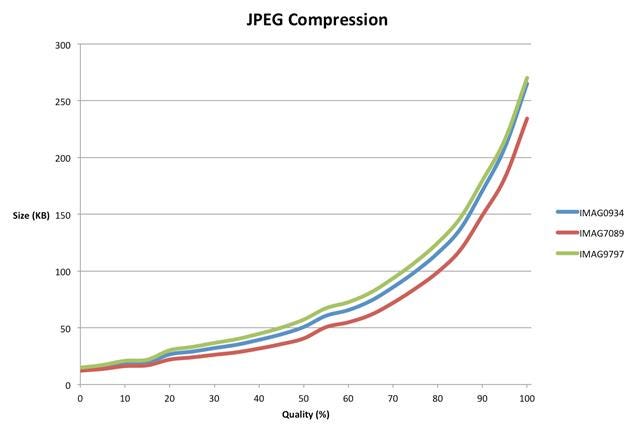
JPEG compression shows file size increasing sharply with higher image quality across three sample images.
The Mobile Data Burden
The impact becomes even more pronounced when considering mobile users worldwide. Large image files consume mobile data at an alarming rate, and in many regions, this translates directly into financial costs for users. The disparity in mobile data costs globally is striking, with some countries paying significantly more per gigabyte than others.[6]
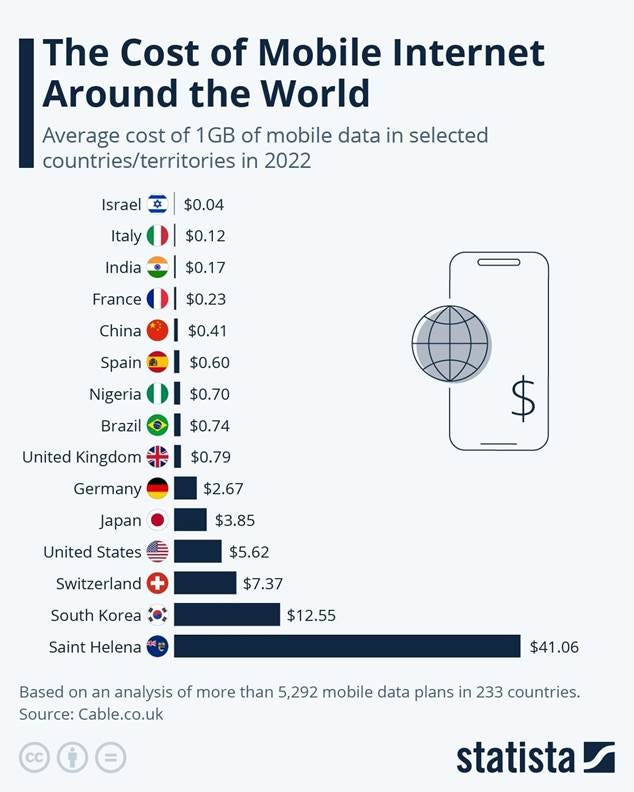
Average cost of 1GB of mobile data in various countries in 2022, highlighting the wide range of mobile internet prices globally.
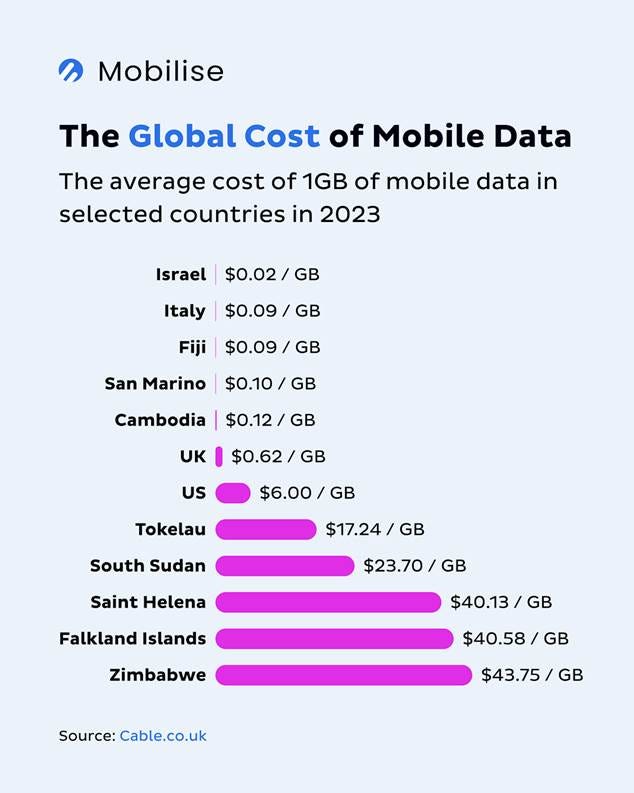
Comparison of the average cost of 1GB of mobile data in various countries in 2023, showing wide variations from $0.02 to $43.75 per GB.
For users on limited data plans or those in areas with expensive mobile internet, downloading high-resolution images can quickly exhaust monthly allowances. This is particularly problematic in regions where mobile data costs remain prohibitively high, creating barriers to accessing visual content online.[7]
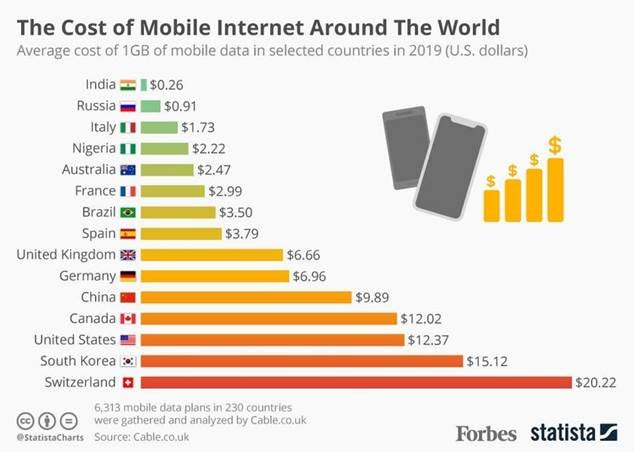
The average cost of 1GB mobile data varies significantly worldwide, impacting mobile internet expenses.
Connection Speed Challenges
Users with slow or unstable internet connections face additional hurdles when encountering large image files. These connections struggle to download dense pixel arrangements efficiently, leading to extended loading times and, in some cases, failed downloads entirely. The problem is compounded when multiple large images appear on a single webpage, overwhelming limited bandwidth capacity.[8][4][9]
Modern websites increasingly rely on visual content to engage users, but this creates a tension between providing appealing visuals and maintaining accessibility for users with varying connection speeds. Studies indicate that 40% of users abandon websites that take longer than 3 seconds to load, directly linking image optimization to user retention.[10]
The Technical Impact
From a technical perspective, large image files strain server resources and increase hosting costs. Bandwidth usage escalates significantly when serving high-resolution images to multiple users simultaneously, particularly during peak traffic periods. Website owners must balance visual quality with performance requirements to maintain optimal user experiences.[3][11]
The file format choice also plays a crucial role in managing size versus quality. Traditional formats like JPEG and PNG, while widely supported, may not offer the best compression efficiency compared to newer formats like WebP and AVIF. These modern formats can reduce file sizes by 25-50% while maintaining comparable visual quality.[12][13][4]
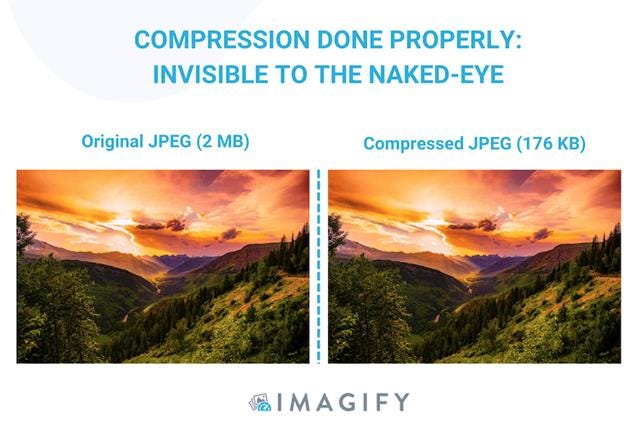
A side-by-side comparison of an original 2 MB JPEG and a visually identical compressed 176 KB JPEG illustrating effective image compression.
Solutions and Optimization Techniques
Addressing large image file challenges requires a multi-faceted approach. Image compression techniques, both lossy and lossless, can significantly reduce file sizes while preserving visual quality. Lossy compression removes some image data that may not be noticeable to viewers, while lossless compression optimizes data storage without any quality loss.[1][12][14]
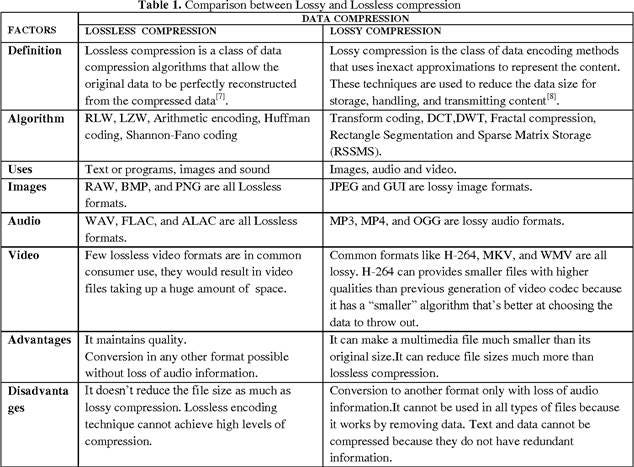
Comparison table highlighting differences between lossless and lossy data compression techniques including definitions, uses, and advantages.
Resizing images to match their display dimensions prevents unnecessary data transfer. Many websites serve images much larger than needed, forcing browsers to download excess data that gets scaled down for display. Proper sizing ensures users only download the pixels they actually see.[14][15][4]
Modern compression tools and services can automatically optimize images during upload, removing metadata and applying appropriate compression settings. These solutions help maintain the balance between visual appeal and technical performance requirements.[16][17]
The Path Forward
The challenge of large image files represents a fundamental tension in modern web design: the desire for high-quality visuals versus the need for fast, accessible experiences. As internet infrastructure continues to improve globally and compression technologies advance, some of these challenges may diminish. However, the disparity in connection speeds and data costs worldwide means that image optimization remains crucial for inclusive web design.
Understanding these challenges helps developers, designers, and content creators make informed decisions about image usage, ensuring their visual content enhances rather than hinders user experiences across diverse global audiences and connection conditions.
⁂
1. https://www.hostinger.com/tutorials/complete-guide-to-image-optimization
2. https://www.imgix.com/blog/12-image-compression-tips-for-peak-website-performance
3. https://shortpixel.com/blog/the-impact-of-image-dimensions-on-performance/
4. https://imagify.io/blog/reasons-images-slow-websites/
5. https://www.commoninja.com/blog/image-optimization-and-its-impact-on-website-speed
6. https://www.getnomad.app/blog/why-am-i-using-mobile-data-so-fast
7. https://patentpc.com/blog/5g-data-consumption-how-much-are-users-using
8. https://discussions.apple.com/thread/2057154
10. https://theessential.agency/blog/are-images-ruining-your-website-experience/
11. https://oit.caes.uga.edu/control-your-image-file-size-for-best-website-performance/
12. https://web.dev/learn/performance/image-performance
13. https://elementor.com/blog/how-to-optimize-images/
14. https://uploadcare.com/blog/how-to-optimize-images-for-web-best-practice-guide/
15. https://wpengine.com/resources/optimize-images-for-web/
16. https://shortpixel.com/blog/image-file-size-reducer/
17. https://imagecompressor.11zon.com/en/image-compressor/compress-image-without-losing-quality
18.
https://www.shrink.media
19. https://image.pi7.org/reduce-image-size-in-kb
20. https://www.shrink.media/blog/how-to-reduce-image-file-size
21. https://www.reddit.com/r/GIMP/comments/119zoqc/is_it_possible_to_reduce_the_size_of_the_image/
23. https://www.adobe.com/uk/creativecloud/photography/discover/image-optimisation.html
24.
https://www.imagesmaller.com
25. https://developers.google.com/speed/docs/insights/OptimizeImages
26. https://www.cloudflare.com/learning/performance/glossary/what-is-an-image-optimizer/
27.
https://www.simpleimageresizer.com
28. https://www.cloudflare.com/it-it/learning/performance/glossary/what-is-image-compression/
29. https://www.iloveimg.com/compress-image
30. https://www.shutterstock.com/search/phone-data-usage
31. https://tridenstechnology.com/mobile-data-statistics/
33. https://explodingtopics.com/blog/mobile-internet-traffic
36. https://www.alao.ch/en/blogs/how-much-data-do-i-need/
37. https://www.shutterstock.com/search/poor-internet-connection
38. https://kocho.co.uk/blog/why-is-mobile-data-usage-growing/
39. https://www.istockphoto.com/photos/slow-internet-loading