JPEG फाइल साइज कम करने के आसान तरीके: वेब ऑप्टिमाइजेशन गाइड
वेब डिजाइनिंग की दुनिया में JPEG इमेज का सही इस्तेमाल एक कला है जो आपकी वेबसाइट की रफ्तार और यूजर एक्सपीरियंस को सीधे प्रभावित करती है। जब आपकी साइट पर भारी-भरकम JPEG फाइलें लगी होती हैं, तो यह न सिर्फ लोडिंग टाइम बढ़ाती है बल्कि आपके विजिटर्स को परेशान करने का काम भी करती है।[1][2]
JPEG का महत्व और उसकी चुनौतियां
JPEG फॉर्मेट का सबसे बड़ा फायदा यह है कि यह complex तस्वीरों को काफी प्रभावी तरीके से compress कर सकता है। लेकिन समस्या तब आती है जब photographers या content creators अपने high-resolution cameras से निकली 5000 pixel चौड़ी तस्वीरों को सीधे वेबसाइट पर upload कर देते हैं। इससे साइट की गति धीमी हो जाती है और बैंडविड्थ की भारी खपत होती है।[3][4][5]
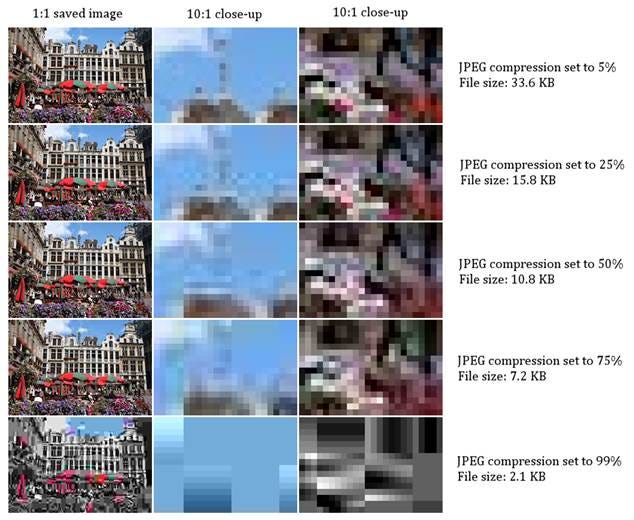
JPEG compression effects on image quality and file size at different compression levels from 5% to 99%.
वेबसाइट स्पीड पर इमेज का प्रभाव
इमेज फाइलें किसी भी वेबसाइट के कुल साइज का 60-70 प्रतिशत हिस्सा होती हैं। बड़ी इमेज फाइलें न सिर्फ लोडिंग टाइम बढ़ाती हैं बल्कि mobile users के लिए समस्या का कारण भी बनती हैं क्योंकि उनके पास सीमित बैंडविड्थ होता है।[6][7][8]
JPEG vs अन्य फॉर्मेट का तुलनात्मक अध्ययन
जब हम JPEG की तुलना अन्य फॉर्मेट से करते हैं, तो WebP जैसे modern formats बेहतर compression देते हैं। WebP फाइलें JPEG से 25-34 प्रतिशत तक छोटी होती हैं और PNG से 26 प्रतिशत तक कम जगह लेती हैं। हालांकि JPEG अभी भी सबसे ज्यादा इस्तेमाल होने वाला फॉर्मेट है क्योंकि यह सभी browsers में सपोर्ट करता है।[9][10][11]
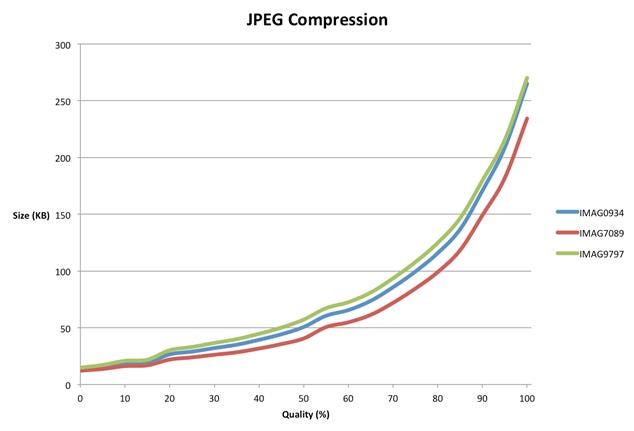
JPEG image quality versus file size graph showing the increase in file size with higher quality settings for different images.
प्रैक्टिकल ऑप्टिमाइजेशन तकनीकें
सही साइज चुनना
Mobile devices के लिए images की width 320px से 720px के बीच रखनी चाहिए, जबकि 640px एक अच्छा balance point है। Desktop के लिए भी images को उनके actual display size के अनुसार resize करना जरूरी है।[12][6]
Compression की रणनीति
JPEG compression में quality setting का सही चुनाव महत्वपूर्ण है। Quality 75 को generally recommended level माना जाता है क्योंकि यह file size और image quality के बीच अच्छा balance बनाता है। TinyJPG जैसे tools 70 प्रतिशत तक file size कम कर सकते हैं बिना visual quality को नुकसान पहुंचाए।[13][11]
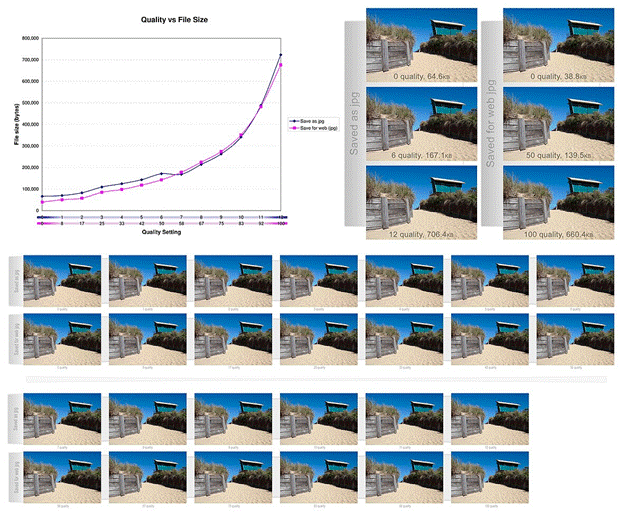
JPEG quality settings impact file size and image clarity; saving for web often reduces file size while preserving acceptable quality.
Responsive Images का इस्तेमाल
Modern websites में HTML के srcset और sizes attributes का इस्तेमाल करके different devices के लिए अलग-अलग image sizes serve करना चाहिए। यह approach mobile users को सिर्फ उतनी ही data download करने को मजबूर करती है जितनी उनके screen size के लिए जरूरी है।[12][14][6]
Automation और Tools
Manual optimization के अलावा, automated solutions भी उपलब्ध हैं। ShortPixel, Optimole, और Cloudinary जैसी services automatic compression और format conversion प्रदान करती हैं। ये tools real-time में images को optimize करके appropriate format और size में deliver करती हैं।[2][12]
Illustration showing website loading speed and optimization with a loading bar and speedometer.
Performance Metrics और Testing
Website की performance को measure करने के लिए GTMetrix, PageSpeed Insights, और WebPageTest जैसे tools का इस्तेमाल करना चाहिए। ये tools आपको बताते हैं कि आपकी images कितनी optimized हैं और कहां सुधार की गुंजाइश है।[4][6]
Loading Speed का प्रभाव
Studies के अनुसार, अगर कोई page 3 seconds से ज्यादा लोड होता है तो users उसे छोड़ देते हैं। यहां तक कि 1 second का delay भी conversions को 7 प्रतिशत तक कम कर सकता है।[8][15]
Lazy Loading की तकनीक
Lazy loading एक बेहतरीन technique है जिसमें images तभी load होती हैं जब user उस हिस्से तक scroll करता है। इससे initial page load time काफी कम हो जाता है। HTML में इसे implement करना भी आसान है – बस loading=”lazy” attribute add करना होता है।[12][14]
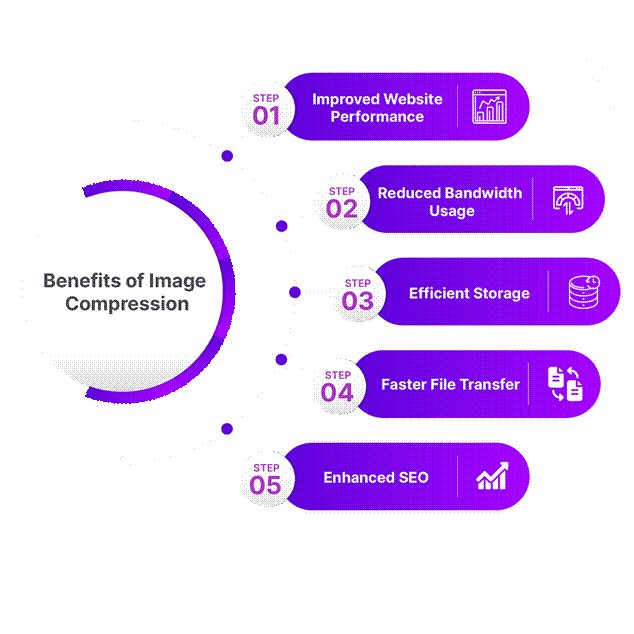
Benefits of image compression: improved website performance, reduced bandwidth, efficient storage, faster transfers, and enhanced SEO.
Future-Ready Optimization
भविष्य में AI-powered tools और भी smart optimization provide करेंगे जो user के device, connection speed, और content type के आधार पर automatically best format और compression level choose करेंगे। AVIF जैसे नए formats भी JPEG को replace कर सकते हैं क्योंकि ये बेहतर compression देते हैं।[6]
निष्कर्ष
JPEG optimization सिर्फ technical exercise नहीं है बल्कि user experience और business success के लिए जरूरी है। सही tools, techniques, और regular performance monitoring के साथ आप अपनी website को तेज़ और efficient बना सकते हैं। याद रखिए कि optimization एक ongoing process है – regular audits और updates जरूरी हैं।
प्रभावी JPEG optimization के लिए format selection, proper sizing, smart compression, और modern techniques जैसे lazy loading का combination करना होगा। इससे न सिर्फ आपकी साइट तेज़ होगी बल्कि SEO rankings भी बेहतर होंगी और users का experience भी improved होगा।
⁂
1. https://pserj.journals.ekb.eg/article_33445_a51d0634f7b57290cb5453f0e1588f03.pdf
2. https://cloudinary.com/guides/web-performance/a-complete-guide-to-website-image-optimization
3. https://www.adogy.com/terms/jpeg-compression/
4. https://wpengine.com/resources/optimize-images-for-web/
6. https://imagify.io/blog/how-to-optimize-images-for-mobile/
7. https://shortpixel.com/blog/the-impact-of-image-dimensions-on-performance/
8. https://www.commoninja.com/blog/image-optimization-and-its-impact-on-website-speed
9. https://wedevs.com/blog/497396/jpeg-vs-png-vs-webp/
10. https://www.wpbeginner.com/beginners-guide/webp-vs-png-vs-jpeg/
11. https://developers.google.com/speed/webp/docs/webp_study
12. https://webflow.com/blog/image-optimization-for-web
13.
https://tinyjpg.com
14. https://elementor.com/blog/how-to-optimize-images/
15. https://help.gempages.net/articles/how-images-on-your-page-impact-loading-speed
16.
https://www.shrink.media
17. https://tiny-img.com/blog/reduce-jpeg-file-size/
18. https://www.cloudflare.com/it-it/learning/performance/glossary/what-is-image-compression/
19. https://helpx.adobe.com/photoshop-elements/using/optimizing-images-jpeg-format.html
20. https://www.adobe.com/acrobat/hub/how-to-compress-a-jpeg.html
21. https://uploadcare.com/blog/jpeg-image-optimization/
22. https://www.shopify.com/blog/7412852-10-must-know-image-optimization-tips
23.
https://compressjpeg.com
25. https://web.dev/learn/performance/image-performance
26. https://www.freeconvert.com/compress-jpeg
27. https://arxiv.org/pdf/1405.6147.pdf
28. https://developers.google.com/search/docs/appearance/google-images
29. https://www.browserstack.com/guide/strategies-for-optimizing-images-for-mobile
30. https://www.outerboxdesign.com/articles/digital-marketing/optimizing-images-for-mobile/
31. https://www.shopify.com/blog/what-is-webp-file
33. https://photutorial.com/image-format-comparison-statistics/
34. https://theessential.agency/blog/are-images-ruining-your-website-experience/
35. https://louispretorius.com/seo/mobile-seo/mobile-image-optimization-2/
37. https://jetpack.com/resources/images-site-speed/