Master Image Optimization for Lightning-Fast Web Performance
Achieving optimal web performance requires careful attention to image optimization strategies. Modern websites face the constant challenge of delivering high-quality visuals while maintaining rapid loading speeds, making image optimization more critical than ever in 2025.
The Performance Impact of Proper Image Optimization
Website loading speed directly correlates with user experience and conversion rates. Research demonstrates that sites loading within 0-2 seconds achieve the highest transaction conversion rates at 8.11%, with performance declining rapidly as load times increase.[1]
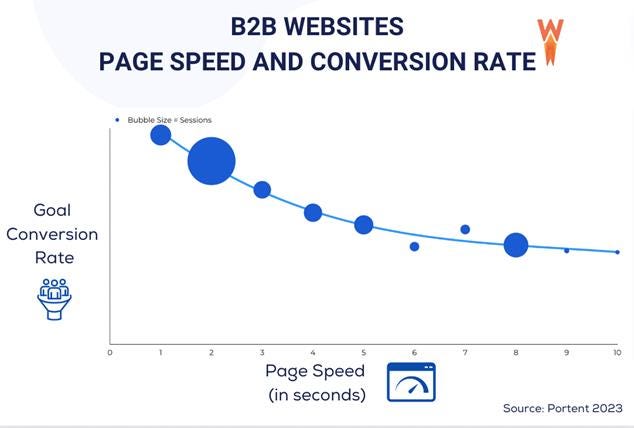
B2B website conversion rates decrease as page speed increases, showing faster websites drive better results, with bubble size indicating session volume.
When examining the relationship between search rankings and page speed, faster-loading websites consistently rank higher in search results,
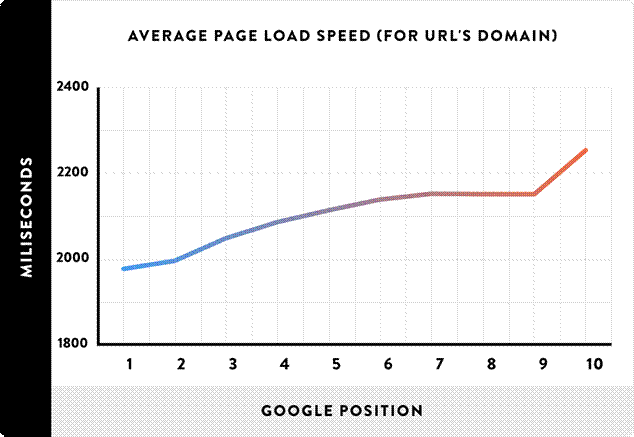
Average page load speed increases with lower Google search result positions, highlighting the importance of site performance for better rankings.
emphasizing the SEO benefits of optimized images.
The compression effectiveness becomes evident when comparing file sizes. Proper compression can reduce a 2MB JPEG to just 176KB while maintaining visual quality that’s virtually indistinguishable to users.
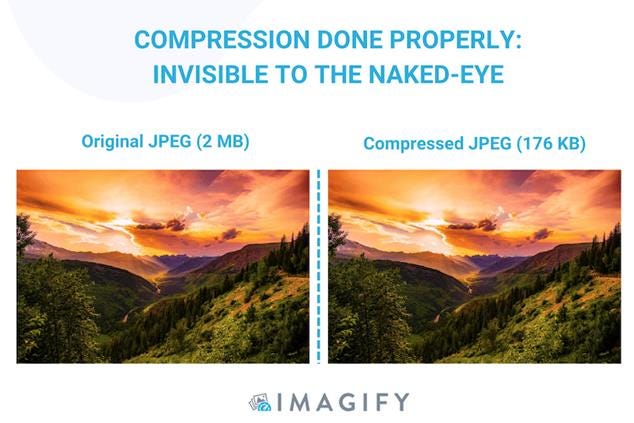
Side-by-side comparison showing original vs compressed JPEG images with minimal visible quality loss.
This dramatic size reduction translates directly into faster loading times and improved user satisfaction.
Modern Image Formats: The Next Generation
WebP: The Established Modern Standard
WebP, developed by Google in 2010, offers 25-34% smaller file sizes than JPEG for equivalent quality and 26% smaller than PNG for lossless compression. This format supports both lossy and lossless compression while maintaining transparency and animation capabilities.[2][3]
AVIF: The Superior Successor
AVIF (AV1 Image File Format) represents the cutting edge of image compression technology. AVIF provides 20% additional size reduction over WebP while supporting HDR and up to 12-bits per channel. The format offers approximately 50% smaller file sizes than JPEG images with superior visual quality.[4][5]
Comparative analysis reveals significant differences in compression efficiency. Lossless JPEG XL achieves the smallest median file size at 131KB, followed by Lossless WebP at 148KB,
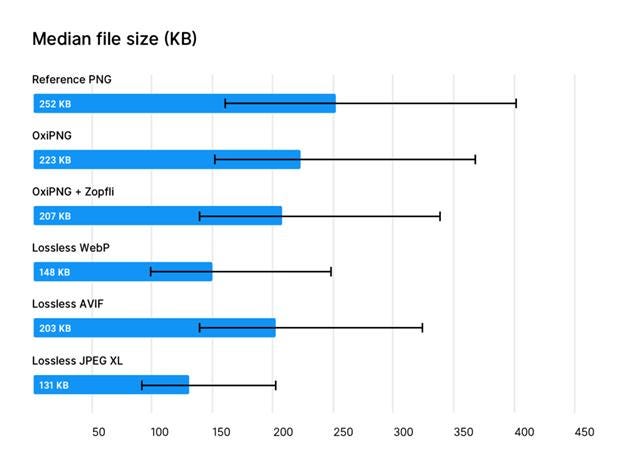
Median file size comparison of popular image formats showing lossless JPEG XL and WebP achieving smaller file sizes than PNG and AVIF.
demonstrating the substantial improvements modern formats provide over traditional PNG files.
JPEG XL: The Future Format
JPEG XL emerges as a promising open-source, royalty-free format supporting wide gamut and HDR with up to 32-bits per channel. While browser support continues growing, this format offers maximum quality and compression efficiency for professional photography and high-quality web images.[4]
Strategic Format Selection Guidelines
Choose WebP for reliable, well-supported applications requiring transparency and animation, making it ideal for everyday web use where extensive browser compatibility is essential.[4]
Select AVIF when prioritizing higher image quality, smaller file sizes, and HDR support. This format represents the optimal choice for high-quality web visuals, though encoding performance requires consideration.[4]
Implement JPEG XL for future-proofing images or achieving maximum quality and compression efficiency, particularly valuable for professional photography applications.[4]
Essential HTML Implementation Techniques
Core Image Attributes
The HTML <img> element requires two fundamental attributes: src for specifying the image path and alt for providing alternative text. The alt attribute serves dual purposes: accessibility for screen readers and SEO benefits for search engines.[6][7]
Dimension attributes play crucial roles in performance optimization. Always specify both width and height attributes to prevent content layout shifts. These attributes allow browsers to allocate space before image loading, improving Core Web Vitals scores.[8]
Advanced Responsive Implementation
The srcset attribute enables sophisticated responsive image delivery. This attribute tells browsers about all available image sizes, allowing optimal selection based on viewport dimensions. Implementation follows this pattern:[9]
<img srcset=”/img/image-lg.png 730w,
/img/image-md.png 610w,
/img/image-sm.png 350w”
src=”/img/image.png”
alt=”Responsive image”>
The sizes attribute provides additional control by defining image display dimensions relative to media conditions. This ensures browsers select appropriate image resolutions even in complex layouts where images don’t span full viewport width.[10][9]
Modern Loading Optimization
Lazy loading represents a critical performance strategy, delaying image loading until elements become visible in the viewport. This technique significantly improves initial page load times by reducing the critical rendering path length.[11]
Implementation requires minimal code:
<img src=”image.jpg” alt=”Description” loading=”lazy”>
Modern browsers support native lazy loading, eliminating the need for complex JavaScript implementations while maintaining backward compatibility.[11]
Compression Strategy Implementation
Trial-and-Error Optimization Approach
Effective image optimization demands systematic testing of various compression methods. Different images respond optimally to different compression techniques, making experimentation essential for identifying the most efficient approach for each use case.[12]
The optimization process follows a cyclical workflow: identify compression opportunities, define quality goals, test various methods, measure results, and refine settings.
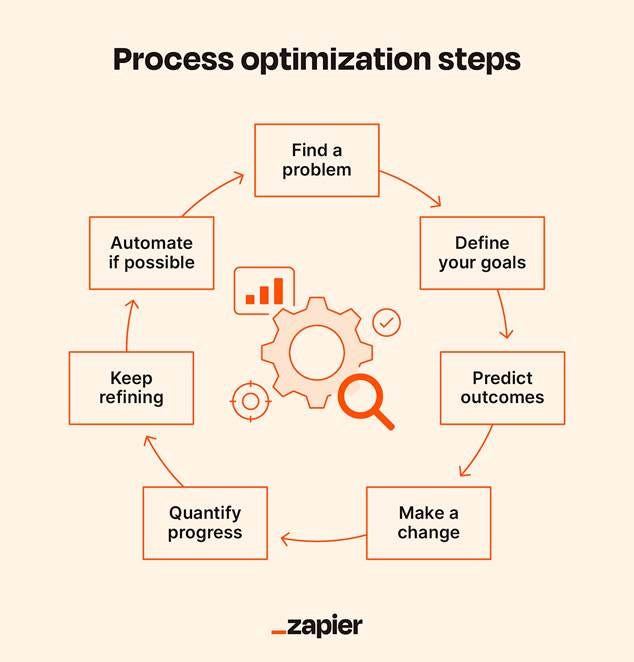
Process optimization steps illustrating an iterative cycle for continuous improvement and automation in workflows.
This iterative approach ensures optimal balance between file size and visual quality.
Automated Optimization Solutions
Modern optimization tools like ShortPixel, Smush, and Imagify provide automated compression that integrates seamlessly with existing workflows. These platforms automatically apply different compression levels based on image content type, removing technical complexity while maintaining optimization quality.[13]
Cloud-based services offer comprehensive solutions by automatically serving the most appropriate image format, size, and quality based on user device, browser, and connection speed. This approach reduces implementation complexity while improving performance metrics across diverse user scenarios.[13]
Quality-Size Balance Considerations
Successful optimization maintains visual quality while achieving significant file size reduction. Compressed images should retain professional appearance without introducing grain or pixelation, ensuring user experience remains uncompromised.[1]
Consider encoding speed alongside compression ratios when selecting formats. Faster encoding leads to quicker first-time renders, particularly important for dynamic content generation and user-uploaded images.[12]
Performance Monitoring and Measurement
Core Web Vitals Integration
Google’s Core Web Vitals prioritize fast-loading websites in search rankings. Image optimization directly impacts Largest Contentful Paint (LCP) metrics by ensuring large images load quickly and efficiently.[12]
Optimized images contribute significantly to improved Core Web Vitals scores, particularly for image-heavy websites where visual content represents the largest contentful elements.[14]
Bandwidth and Cost Optimization
Reducing image file sizes decreases data transfer requirements, significantly cutting bandwidth usage and associated costs. This benefit proves particularly valuable for high-traffic websites or applications serving large media files.[12]
Mobile optimization gains special importance as mobile users require smooth, fast browsing experiences regardless of device or network speed. Compressed images ensure consistent performance across diverse access conditions.[12]
Future-Proofing Your Image Strategy
The image format landscape continues evolving with several groundbreaking formats expected to emerge in coming years. These innovations promise even smaller file sizes while maintaining or improving visual quality standards.
Universal HTML structure remains consistent across all image formats,
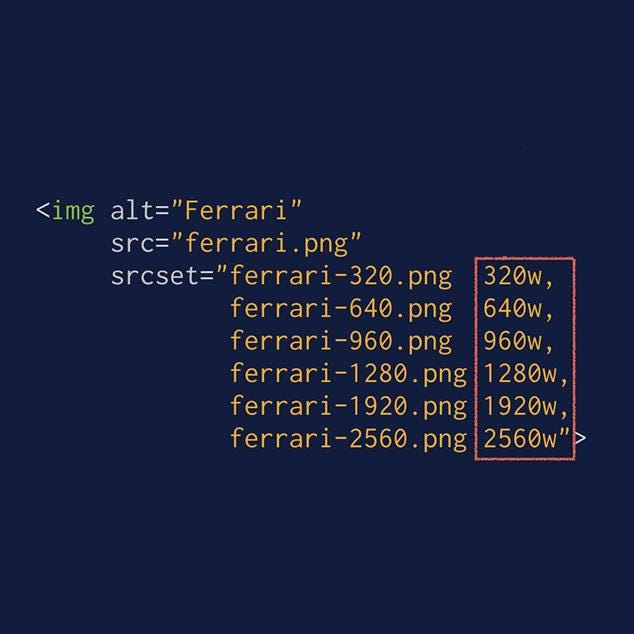
HTML example showing the img tag with multiple image sources in srcset for responsive image loading.
ensuring future format adoption requires minimal code changes. This consistency allows developers to focus on compression optimization rather than structural modifications.
Staying informed about evolving standards and best practices ensures continued optimization effectiveness as new technologies become available. Regular evaluation of compression tools and techniques maintains competitive performance advantages.
The foundation of effective image optimization rests on understanding that slow loading creates the same negative impact as poor design contrast—both represent missed opportunities for strong user impressions. By implementing systematic optimization approaches, leveraging modern formats, and maintaining focus on user experience, websites achieve the instant, seamless loading that modern users expect and demand.
⁂
2. https://www.rumvision.com/blog/modern-image-formats-webp-avif-browser-support/
3. https://www.dreamhost.com/blog/modern-image-formats/
4. https://cloudinary.com/blog/advanced-image-formats-and-when-to-use-them
5. https://developer.mozilla.org/en-US/docs/Web/Media/Guides/Formats/Image_types
6. https://www.w3schools.com/html/html_images.asp
7. https://www.homeandlearn.co.uk/WD/wds4p4.html
8. https://developer.mozilla.org/en-US/docs/Web/HTML/Reference/Elements/img
9. https://www.keycdn.com/blog/responsive-images
10. https://amp.dev/documentation/guides-and-tutorials/develop/style_and_layout/art_direction/
11. https://developer.mozilla.org/en-US/docs/Web/Performance/Guides/Lazy_loading
12. https://www.imgix.com/blog/12-image-compression-tips-for-peak-website-performance
13. https://www.marketmymarket.com/2025-image-optimization-guide-for-seo-social-media-performance/
14. https://www.linkedin.com/pulse/how-optimize-images-2025-comprehensive-guide-modern-web-karim-xuw9c
15. https://www.cloudflare.com/it-it/learning/performance/glossary/what-is-image-compression/
16. https://frontendmasters.com/blog/optimizing-images-for-web-performance/
17. https://www.hostinger.com/tutorials/complete-guide-to-image-optimization
18. https://web.dev/learn/performance/image-performance
19. https://elementor.com/blog/how-to-optimize-images/
20. https://web.dev/articles/choose-the-right-image-format
21.
https://tinypng.com
22. https://uploadcare.com/blog/how-to-optimize-images-for-web-best-practice-guide/
23. https://www.smashingmagazine.com/2021/09/modern-image-formats-avif-webp/
24.
25. https://developers.google.com/search/docs/appearance/google-images
26. https://developer.chrome.com/docs/lighthouse/performance/uses-webp-images
27. https://javascript.plainenglish.io/lazy-loading-isnt-optional-in-2025-here-s-proof-de1769b47c54
28. https://www.wufoo.com/html5/heightwidth-attributes/
29.
30. https://nitropack.io/blog/post/what-is-lazy-loading
31. https://developer.mozilla.org/en-US/docs/Web/HTML/Guides/Responsive_images
32. https://www.browserstack.com/guide/lazy-loading-in-react
33. https://www.w3schools.com/tags/tag_img.asp
35. https://nextjs.org/docs/app/guides/lazy-loading
36. https://www.w3schools.com/tags/att_img_width.asp
37. https://www.debugbear.com/blog/responsive-images
38. https://elementor.com/blog/what-is-lazy-loading/
39. https://html.spec.whatwg.org/multipage/images.html
40. https://onpointplugins.com/responsive-image-srcset-sizes/