The Revolutionary Power of SVG: Why Vector Graphics Are a Web Developer’s Dream Come True
The Revolutionary Power of SVG: Why Vector Graphics Are a Web Developer’s Dream Come True
The world of web graphics has been transformed by one remarkable format: Scalable Vector Graphics (SVG). This mathematical approach to creating images has revolutionized how we think about web performance, file sizes, and visual quality across all devices.
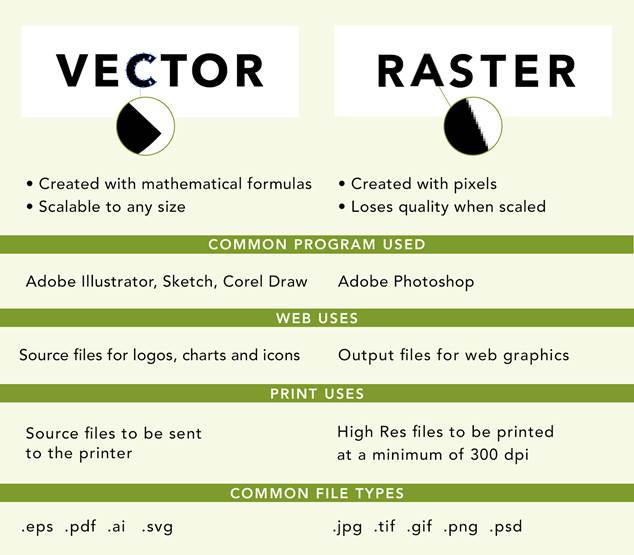
Comparison of vector and raster images highlighting their creation, scalability, common software, web and print uses, and typical file formats.
The Mathematical Magic Behind SVG
Unlike traditional raster images that store information for millions of individual pixels, SVG employs mathematical formulas to define shapes, lines, and curves. This fundamental difference creates what can only be described as pure digital magic. Instead of recording every single pixel’s color and position, SVG files contain elegant mathematical instructions that tell your browser exactly how to draw each element.[1][2][3][4]
When you see an SVG logo or icon, you’re witnessing the power of coordinate geometry in action. A circle becomes a simple mathematical equation, a curved line transforms into a Bézier curve formula, and complex shapes emerge from combinations of basic geometric primitives. This mathematical foundation is what makes SVG files so remarkably efficient and scalable.[3][4]
Line icon illustrating mathematical formulas with a gear, bar chart, and ascending arrow along with formula x = 2m².
File Size Advantages: Where SVG Truly Shines
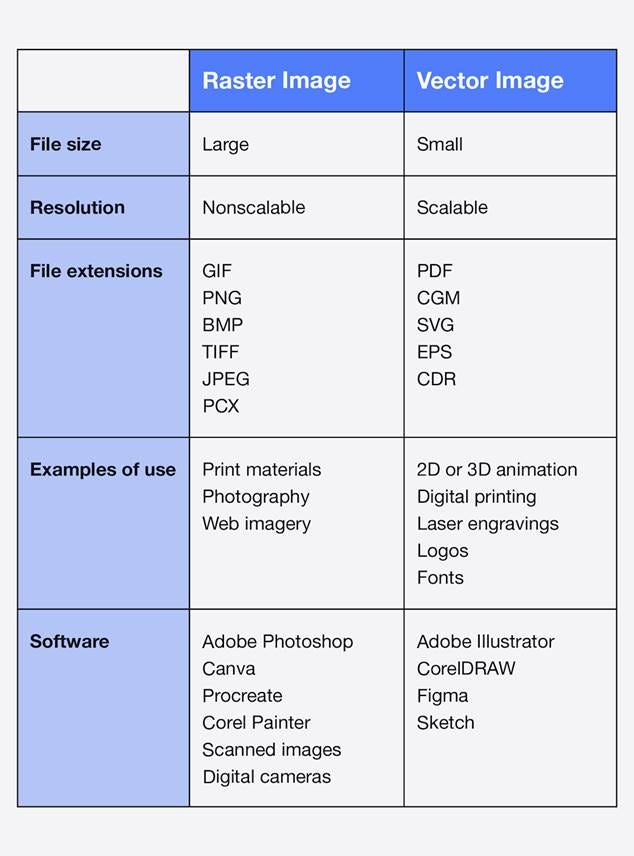
The most compelling advantage of SVG graphics lies in their astoundingly small file sizes. While a high-resolution PNG or JPEG of a detailed logo might consume several megabytes, an equivalent SVG version often weighs in at just a few kilobytes. This dramatic difference occurs because vector files only store the mathematical formulas and color information needed to recreate the image, rather than data for millions of individual pixels.[1][2][5][6][7]
Consider this remarkable contrast: a raster image must store information for every single pixel – a 3072 x 2048 image requires data for over 6 million pixels. Meanwhile, an SVG file of the same visual complexity might contain just a handful of mathematical curves and color definitions.[7][8]
Comparison of raster and vector images showing differences in file size, scalability, file extensions, usage examples, and software.
The file size remains virtually unchanged whether the image displays at 100 pixels wide or 10,000 pixels wide.[2][6]
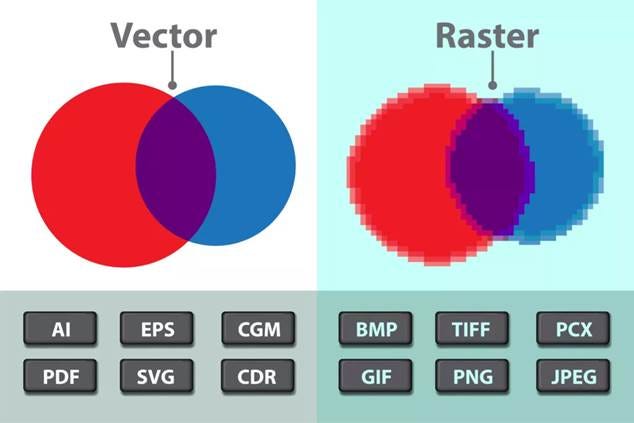
Comparison of vector graphics with smooth edges and file formats versus pixelated raster graphics and their file formats.
The Language of Graphics: SVG as Programming
SVG stands for Scalable Vector Graphic, but it represents much more than a simple file format – it’s a complete programming language specifically designed for graphics. Built on XML syntax, SVG allows developers to create, modify, and animate graphics using code. This programmable nature means you can dynamically alter colors, shapes, and animations using CSS and JavaScript.[9][10][11][12][13][14]
The XML-based structure makes SVG files readable by both browsers and search engines, providing significant SEO benefits. Search engines can index the text content within SVG files, and screen readers can access embedded descriptions, making your graphics more accessible.[10][15][16][9]
Infinite Scalability: The Resolution Revolution
Perhaps the most celebrated feature of SVG graphics is their perfect scalability without quality loss. Whether displayed on a smartphone screen or a massive billboard, SVG images maintain crisp, sharp edges at any size. This resolution independence eliminates the need to create multiple versions of the same image for different screen densities and device types.[1][2][17][6][18]
Traditional raster images become pixelated and blurry when enlarged beyond their native resolution. SVG graphics, being mathematically defined, can scale infinitely while maintaining perfect clarity. This scalability makes them ideal for responsive web design, where images must adapt to countless screen sizes and resolutions.[2][17][18][7][8][15][1]
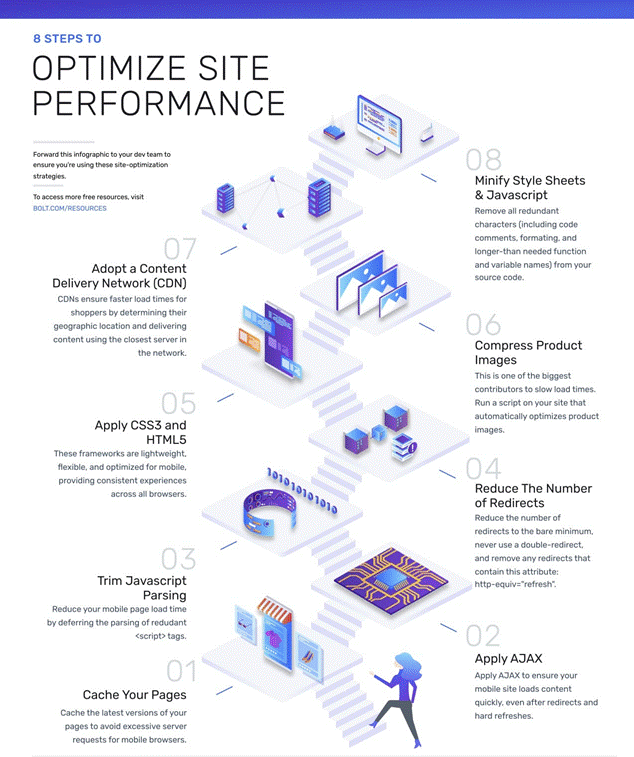
Infographic illustrating 8 practical steps to optimize website performance, including caching, AJAX, minimizing redirects, compressing images, using CDNs, and minifying code.
Creating SVG Files: From Concept to Code
Modern vector graphics software has made SVG creation remarkably straightforward. Adobe Illustrator, Sketch, Inkscape, and other professional tools can export clean, optimized SVG files with just a few clicks. The export process typically involves selecting the SVG format and choosing optimization settings to minimize file size while preserving visual quality.[2][19][20][21]
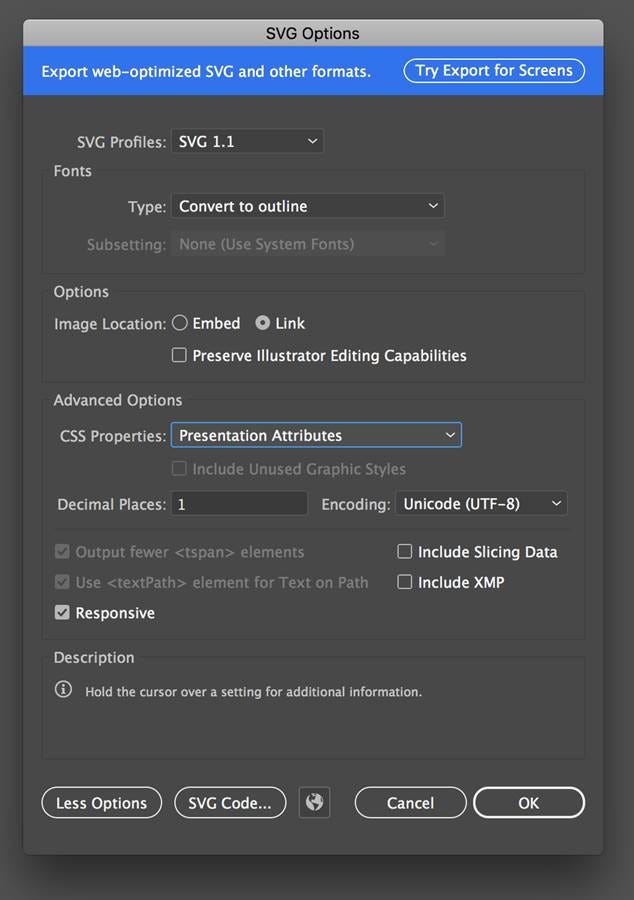
For those working with Adobe Illustrator, the SVG export dialog provides comprehensive control over the final output, including options for styling, fonts, images, and responsive settings. These tools ensure that the exported SVG files are web-optimized and ready for deployment.[19][22][21]
Performance Impact on Modern Websites
The performance benefits of SVG graphics extend far beyond file size reduction. Smaller files mean faster loading times, which directly impacts user experience and search engine rankings.[17][6]
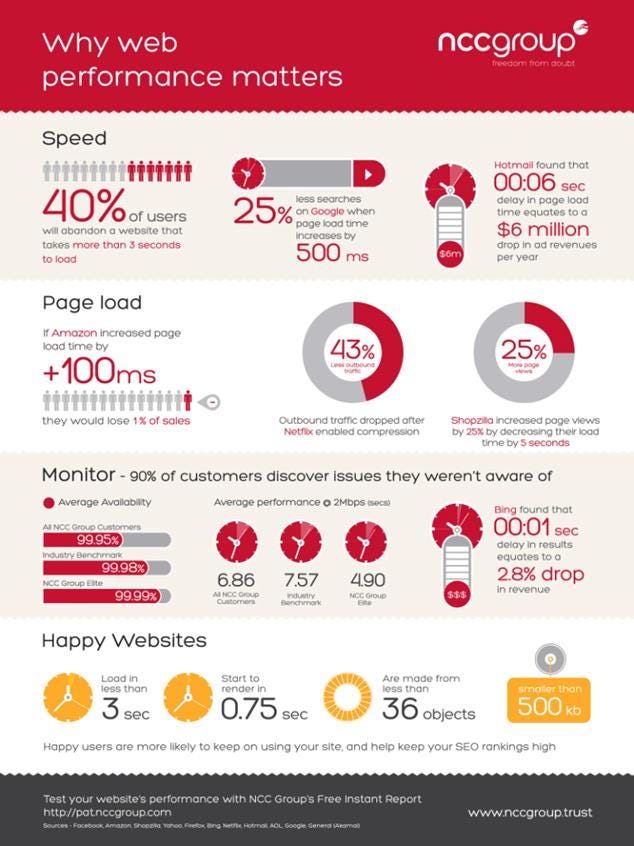
Web performance matters: faster load times significantly impact user retention, sales, and revenue, emphasizing the importance of optimized, small file sizes.
Studies show that users abandon websites taking more than 3 seconds to load, making every kilobyte crucial for maintaining engagement.
SVG files also reduce server load and bandwidth consumption, particularly beneficial during high-traffic periods. The format’s ability to be cached effectively means subsequent page loads become even faster. Additionally, since SVG graphics can be embedded directly in HTML, they eliminate additional HTTP requests that separate image files would require.[2][6][22]
When to Choose SVG Over Other Formats
SVG graphics excel in specific use cases where their unique properties provide maximum benefit. They’re ideally suited for logos, icons, illustrations, and simple graphics with clean lines and solid colors. However, they’re not optimal for photographs or images with complex gradients and fine detail, where raster formats like JPEG or PNG perform better.[2][23][24][22]
The decision to use SVG should consider the image’s complexity, intended use, and target audience. Simple graphics with geometric shapes, text, and solid colors are perfect candidates for SVG conversion. Complex photographic images with millions of colors and subtle gradients are better served by optimized raster formats.[24][22]
Future-Proofing Your Graphics
SVG graphics represent a future-proof solution for web graphics. As display technologies evolve toward higher resolutions and new form factors, SVG images automatically adapt without requiring updates or replacements. This scalability ensures your graphics will look perfect on today’s devices and tomorrow’s innovations.[2][6][18]
The format’s support for animation and interactivity also positions it well for the web’s evolution toward more dynamic, engaging content. As websites increasingly incorporate interactive elements and animations, SVG’s native support for these features becomes invaluable.[9][18][10]
The mathematical elegance of SVG graphics offers web developers and designers an unparalleled combination of small file sizes, infinite scalability, and programming flexibility. When you can confidently use an SVG, the choice becomes obvious – embrace this remarkable format and enjoy the performance benefits it brings to your web projects.