





Don't Lose a Second: A Clear Guide to HTML Dates and Times
Unlock the power of the `` element to make your content smarter, clearer, and more professional for both visitors and search engines.
Have you ever stared at a date like "05-08-2025" and wondered, "Is that May 8th or August 5th?" It's a common headache. This ambiguity is not just confusing for people; it's a nightmare for computers, search engines, and accessibility tools that thrive on precision. Handling dates and times can feel chaotic, but what if there was a simple, elegant HTML element designed to solve this very problem? The Transcendent is here to guide you through it.
Fortunately, HTML provides a dedicated element for marking up dates, times, and durations: the `` element. This small but mighty tag ensures that time-related data is perfectly understandable to everyone and everything, from your website visitors to Google's web crawlers.
The Two Faces of Time: For Humans and Machines
The magic of the `` element lies in its dual nature. It presents information in two ways simultaneously:
- A Human-Readable Version: This is the text you place between the opening `<time>` and closing `</time>` tags. It's what your visitors see on the page. You have complete freedom here—write "yesterday," "next Friday," "May 8th, 2025," or "8 May 2025."
- A Machine-Readable Version: This is provided using the `datetime` attribute inside the opening tag. It follows a strict, standardized format (ISO 8601) that computers can process without any confusion. [14]
This separation is the key. You get user-friendly text on the front end, while search engines, screen readers, and other systems get the precise, structured data they need on the back end. [5, 12]
Anatomy of the `` Element
Let's break down how it's constructed. At its core, an HTML element with an attribute follows a simple pattern: the element name, the attribute name, an equals sign, and the attribute's value in quotes.
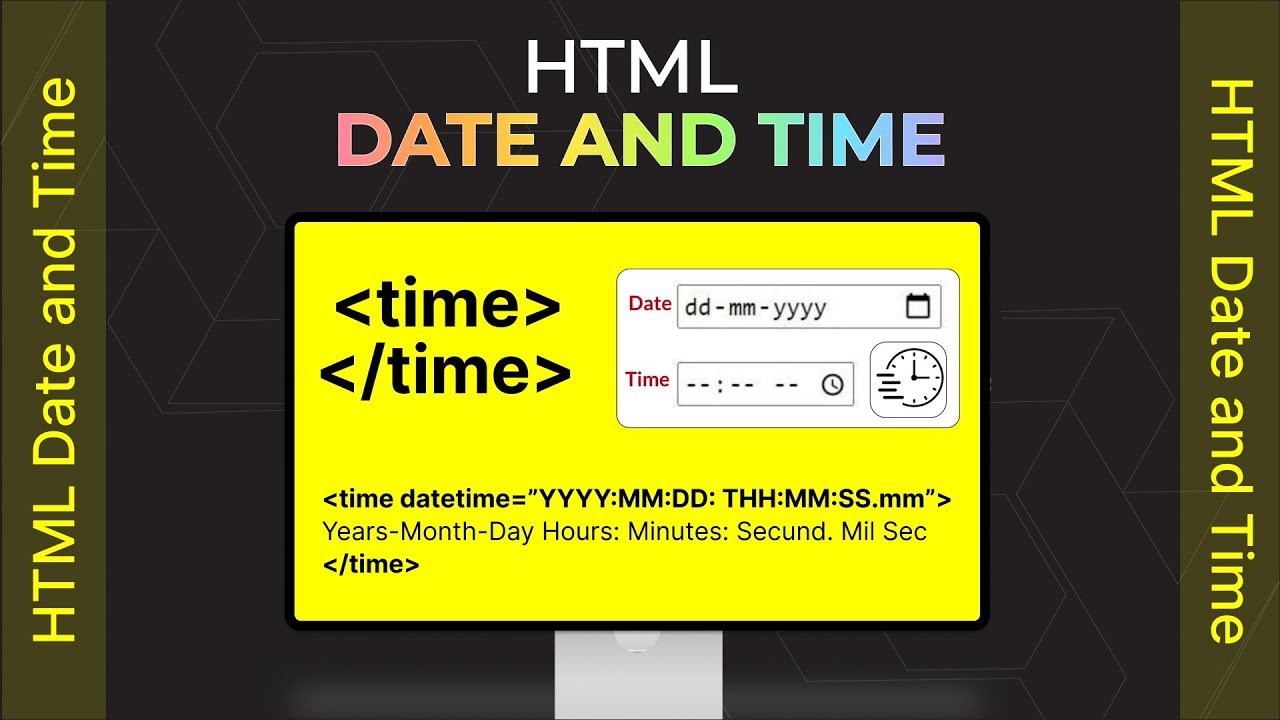
Below is a graphical text representation of the `` element structure. The element itself is `time`. It contains the `datetime` attribute, which is assigned a machine-readable value in "YYYY-MM-DD" format. The content visible to the user, "May 8th," is placed between the opening and closing tags.
<time datetime="2025-05-08">May 8th</time>This simple line of code tells the browser to display "May 8th" to the user, but it also tells machines the exact date is May 8, 2025. This removes all ambiguity.
Mastering the `datetime` Attribute: Your Step-by-Step Guide
The `datetime` attribute is where the real power lies. While the format is strict, it's also incredibly flexible. Let's walk through the most common use cases.
1. A Simple Date
For a full date, the format is always YYYY-MM-DD.
Code graphic showing the `` element used for a specific date. The `datetime` attribute provides the full year, month, and day, while the human-readable text is a more casual format.
We are launching on <time datetime="2025-05-08">May 8th, 2025</time>.2. Date and Time Combined
To include a specific time, add a "T" followed by the time in 24-hour format (HH:MM). You can also include seconds (HH:MM:SS).
Infographic text explaining the combination of date and time. It highlights the `T` separator between the date and time components within the `datetime` attribute.
The webinar begins at <time datetime="2025-09-10T14:00">2 PM on September 10th</time>.3. Adding a Timezone
For global audiences, specifying a timezone is crucial. You can add a timezone offset from UTC. For example, New York City is 5 hours behind UTC (-05:00).
Code box illustrating how to add a timezone offset. The `datetime` value includes the date, time, and the UTC offset, making it precise for a global audience.
The live event starts at <time datetime="2025-11-20T20:00-05:00">8:00 PM Eastern Time</time>.4. Just the Time
Sometimes, you only need to specify a time.
A simple code example showing the `` tag used for a time-only value, following the 24-hour format.
Our daily meeting is at <time datetime="09:30">9:30 AM</time>.
Why Should You Bother? The Real-World Benefits
Using the `` element isn't just about following the rules; it delivers tangible benefits that enhance your website:
- Enhanced SEO: Search engines like Google use this structured data to understand your content better. [5] For an event, Google might use the `` element to create a rich snippet in the search results, showing the date and time directly. [16] For an article, it signals content freshness, which can be a ranking factor. [5]
- Improved Accessibility: Screen readers and other assistive technologies can interpret the machine-readable `datetime` value, providing a clear and unambiguous experience for users with disabilities. [2]
- Future-Proofing Your Content: Browsers and personal assistants can leverage this data. Imagine a user highlighting an event on your page, and their browser instantly offers to add it to their calendar with the correct date and time already filled in. [11, 20] That's the power of semantic HTML.
For more insights and best practices, feel free to visit us at thetranscendent.org.
Conclusion
In web development, clarity is kindness. The `` element is a perfect example of this principle. By taking a few extra seconds to add this tag, you eliminate ambiguity, improve user experience, boost your SEO, and make your content more accessible. You're building a bridge between the way humans read time and the way machines understand it. It’s a small step that makes your website smarter, more functional, and more professional.
| Step | Headline | Description |
|---|---|---|
| 1 | Identify Time-Related Content | Find any date, time, or duration mentioned on your page (e.g., "Published on Jan 15," "Event starts at 8 PM"). |
| 2 | Wrap with the `` Tag | Enclose the human-readable text with `<time>` and `</time>` tags. |
| 3 | Add the `datetime` Attribute | Inside the opening tag, add the `datetime` attribute with the value in the correct machine-readable format (e.g., `datetime="2025-01-15T20:00"`). |
| 4 | Verify the Format | Double-check that your `datetime` value follows the ISO 8601 standard to ensure it's universally understood. [14] |
Frequently Asked Questions
Can I use the `` tag for durations?
Yes! You can specify a duration using the `datetime` attribute. The format starts with a "P" (for period). For example, `datetime="PT2H30M"` represents a duration of 2 hours and 30 minutes. [12]
What if I only know the month and year?
No problem. The format is flexible. You can provide just the year (`datetime="2025"`) or the year and month (`datetime="2025-05"`). [8]
Does the `` element change how my text looks?
By default, no. The `` element is a semantic tag, meaning it adds context and meaning to your code without changing the visual appearance. However, you can easily style it with CSS just like any other HTML element.
Is the `datetime` attribute required?
It is not strictly required, but omitting it defeats the primary purpose of the tag, which is to provide a machine-readable version of the time. Without it, the element only acts as a semantic wrapper with less functional benefit. [12]
Chapter Resources:
https://codepen.io/the-Transcendent/pen/myyaXad
All Resources:
https://codepen.io/collection/KwdZdm